
Monitor Your Agent
Observability Ingest API
Overview
The Observability Ingest API allows you to send production conversation data from your existing Evalion Agent for automated quality evaluation and monitoring. This endpoint accepts either audio files or pre-transcribed conversations and automatically evaluates them against your configured metrics.
Use Cases
- Production Monitoring: Automatically evaluate all your production calls in real-time
- Quality Assurance: Track conversation quality metrics across your agent fleet
- Compliance: Monitor adherence to scripts, policies, and regulations
- Performance Analytics: Gather data for performance reporting and improvement
How to Use the Observability API
To effectively use the Observability API, follow these steps:
- Configure Metrics: Set up which metrics should be evaluated for your agent
- Ingest Data: Send conversation data (audio or transcript) via the API
- View Results: Access evaluation results in the Monitoring section of the platform
Configuring Metrics for Agents
Before ingesting conversations, you should configure which metrics to evaluate for each agent:
In the Platform
- Go to your Project settings
- Select the Agent you want to configure
- Navigate to the Observability Metrics section
- Enable the metrics you want to automatically evaluate for this agent's conversations
- Save your configuration
Once configured, all conversations ingested for that agent will automatically be evaluated against the enabled metrics.

Ingesting Data
To send conversation data to Evalion for evaluation, you need to call the Observability Ingest API endpoint with either:
- Audio files (MP3, OGG, or WAV format) - Evalion will transcribe and evaluate the conversation
- Transcript files (OpenAI JSON format) - For faster processing when you already have transcripts
Each API call must include metadata such as project ID, agent ID, timestamp, and customer phone number. The system will process your data asynchronously and make results available in the platform within seconds to minutes.
Viewing Ingested Data
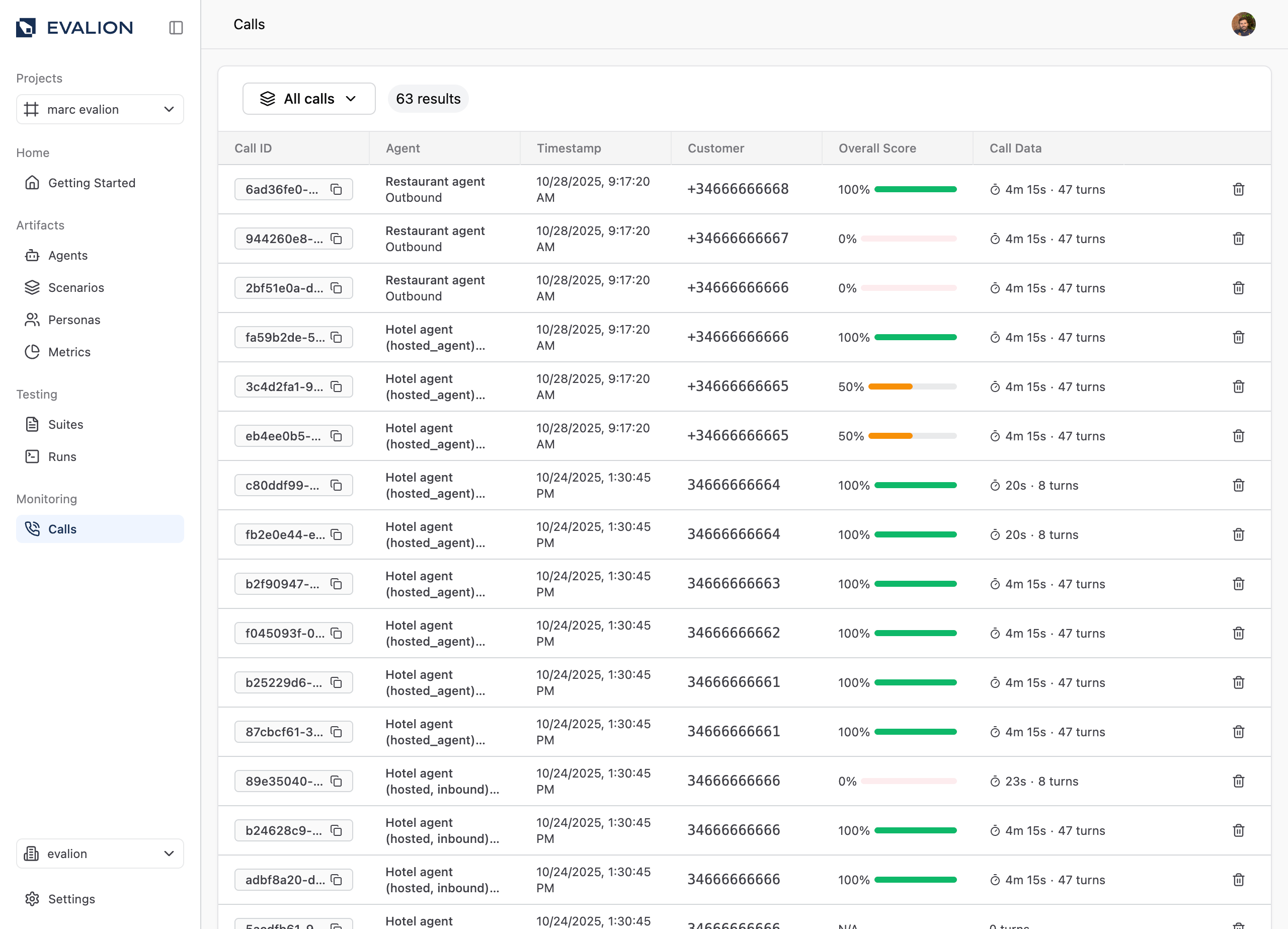
After ingesting conversations through this API, you can view and analyze them in the Evalion platform:
- Navigate to the Monitoring section in the left sidebar
- Click on the Calls menu item
- You'll see all ingested conversations with their evaluation results
- Click on individual calls to see detailed metrics, transcripts, and scores
Ingest API
Endpoint
POST /api/v1/observability/ingestRequired permissions: Project MEMBER or higher
Request Format
The endpoint accepts multipart/form-data with the following parameters:
Query Parameters
| Parameter | Type | Required | Description |
|---|---|---|---|
project_id | UUID | Yes | UUID of the project |
agent_id | UUID | Yes | UUID of the agent that handled the conversation |
Form Fields
| Field | Type | Required | Description |
|---|---|---|---|
timestamp | Integer | Yes | Unix timestamp (seconds since epoch) of when the conversation occurred |
customer_phone | String | Yes | Customer phone number (max 50 characters) |
audio_file | File | No* | Audio file of the conversation (MP3, OGG, or WAV format, max 50 MB) |
transcript_file | File | No* | JSON transcript file in OpenAI format (max 5 MB) |
external_conversation_id | String | No | Your system's conversation ID for reference |
extra_metadata | String | No | Additional metadata as a JSON string |
*Note: You must provide either audio_file OR transcript_file, but not both.
File Size Restrictions
- Audio files: Maximum 50 MB
- Transcript files: Maximum 5 MB
Files exceeding these limits will be rejected with a 413 Request Entity Too Large error.
Response
Success Response (201 Created)
{
  "id": "550e8400-e29b-41d4-a716-446655440000",
  "project_id": "123e4567-e89b-12d3-a456-426614174000",
  "agent_id": "987e6543-e21b-12d3-a456-426614174000",
  "external_conversation_id": "call-12345",
  "timestamp": "2023-10-30T10:30:00Z",
  "customer_phone": "+1234567890",
  "interaction_mode": "voice",
  "call_duration": 180.5,
  "audio_url": "gs://bucket/path/to/audio.mp3",
  "transcript": "... formatted transcript ...",
  "extra_metadata": {
    "call_type": "inbound",
    "duration": 180,
    "metric_ids": ["metric-uuid-1", "metric-uuid-2"]
  },
  "source": "api",
  "agent": {
    "id": "987e6543-e21b-12d3-a456-426614174000",
    "name": "Customer Support Agent"
  },
  "evaluations": [],
  "builtin_evaluations": [],
  "created_at": "2023-10-30T10:32:00Z",
  "updated_at": "2023-10-30T10:32:00Z"
}
Response Fields
| Field | Type | Description |
|---|---|---|
id | UUID | Unique identifier for the conversation |
project_id | UUID | Project ID |
agent_id | UUID | Agent ID |
external_conversation_id | String | Your system's conversation ID (if provided) |
timestamp | ISO DateTime | When the conversation occurred |
customer_phone | String | Customer phone number |
interaction_mode | String | "voice" or "text" |
call_duration | Float | Duration in seconds (null if not yet calculated) |
audio_url | String | GCS URL to the audio file (if audio was uploaded) |
transcript | String | The conversation transcript |
extra_metadata | Object | Additional metadata including metric IDs |
source | String | Always "api" for ingested conversations |
agent | Object | Agent information |
evaluations | Array | List of evaluation results (populated asynchronously) |
builtin_evaluations | Array | List of builtin metric evaluations (populated asynchronously) |
created_at | ISO DateTime | When the record was created |
updated_at | ISO DateTime | When the record was last updated |
Evaluation Processing
Asynchronous Processing
When you ingest a conversation, the evaluation process happens asynchronously:
- Immediate Response: You receive a 201 response with the conversation record
- Background Processing: Evaluations are queued and processed in the background
- Results Available: Evaluation results appear in the platform's Monitoring > Calls section within seconds to minutes
Metrics Evaluated
The endpoint evaluates the conversation against:
- Agent Metrics: Uses the agent's configured observability metrics
- Builtin Metrics: Standard metrics like call duration, conversation flow, etc.
Error Responses
400 Bad Request
{
  "detail": "Must provide either audio_file or transcript_file."
}
Common causes:
- Missing both audio and transcript files
- Providing both audio and transcript files
- Invalid JSON in
transcript_fileorextra_metadata - Invalid transcript format
- No metrics available for evaluation
401 Unauthorized
{
  "detail": "Not authenticated"
}
Cause: Missing or invalid API token
403 Forbidden
{
  "detail": "Insufficient permissions"
}
Cause: User doesn't have MEMBER or higher permissions on the project
404 Not Found
{
  "detail": "Project {project_id} not found"
}
Common causes:
- Invalid
project_id - Invalid
agent_id - Agent doesn't belong to the specified project
500 Internal Server Error
{
  "detail": "Failed to ingest conversation: {error message}"
}
Common causes:
- File upload failure
- Database error
- Internal processing error
Audio File Ingestion Example
Supported Formats
- MP3 (
.mp3) - OGG (
.ogg) - WAV (
.wav)
Example Request (cURL)
curl -X POST "https://api.evalion.ai/api/v1/observability/ingest?project_id=123e4567-e89b-12d3-a456-426614174000&agent_id=987e6543-e21b-12d3-a456-426614174000" \
  -H "Authorization: Bearer YOUR_API_TOKEN" \
  -F "timestamp=1698624000" \
  -F "customer_phone=+1234567890" \
  -F "audio_file=@/path/to/call-recording.mp3" \
  -F "external_conversation_id=call-12345" \
  -F 'extra_metadata={"call_type":"inbound","duration":180}'
Example Request (Python)
import requests
from datetime import datetime

url = "https://api.evalion.ai/api/v1/observability/ingest"

# Your API token
headers = {
    "Authorization": "Bearer YOUR_API_TOKEN"
}

# Query parameters
params = {
    "project_id": "123e4567-e89b-12d3-a456-426614174000",
    "agent_id": "987e6543-e21b-12d3-a456-426614174000"
}

# Form data
files = {
    "audio_file": open("call-recording.mp3", "rb")
}

data = {
    "timestamp": int(datetime.now().timestamp()),
    "customer_phone": "+1234567890",
    "external_conversation_id": "call-12345",
    "extra_metadata": '{"call_type": "inbound", "duration": 180}'
}

response = requests.post(url, headers=headers, params=params, files=files, data=data)

if response.status_code == 201:
    conversation = response.json()
    print(f"Conversation created: {conversation['id']}")
else:
    print(f"Error: {response.status_code} - {response.text}")
Transcript File Ingestion Example
OpenAI Transcript Format
The transcript file should be a JSON array of message objects:
[
  {
    "role": "user",
    "content": "Hello, I would like assistance with my account.",
    "start_time": 0.0,
    "end_time": 3.2
  },
  {
    "role": "assistant",
    "content": "Hello! I'd be happy to help you with your account. Can you please provide your account number?",
    "start_time": 3.5,
    "end_time": 8.1
  },
  {
    "role": "user",
    "content": "Sure, it's 123456789.",
    "start_time": 8.5,
    "end_time": 10.2
  },
  {
    "role": "assistant",
    "content": "Thank you. I've found your account. How can I assist you today?",
    "start_time": 10.5,
    "end_time": 14.0
  }
]
Transcript Field Descriptions
| Field | Type | Required | Description |
|---|---|---|---|
role | String | Yes | Either "user" (customer) or "assistant" (agent) |
content | String | Yes | The text content of the message |
start_time | Float | Yes | Start time in seconds from the beginning of the conversation |
end_time | Float | Yes | End time in seconds from the beginning of the conversation |
Example Request (cURL)
curl -X POST "https://api.evalion.ai/api/v1/observability/ingest?project_id=123e4567-e89b-12d3-a456-426614174000&agent_id=987e6543-e21b-12d3-a456-426614174000" \
  -H "Authorization: Bearer YOUR_API_TOKEN" \
  -F "timestamp=1698624000" \
  -F "customer_phone=+1234567890" \
  -F "transcript_file=@/path/to/transcript.json" \
  -F "external_conversation_id=call-12345"
Example Request (Python)
import requests
import json
from datetime import datetime

url = "https://api.evalion.ai/api/v1/observability/ingest"

headers = {
    "Authorization": "Bearer YOUR_API_TOKEN"
}

params = {
    "project_id": "123e4567-e89b-12d3-a456-426614174000",
    "agent_id": "987e6543-e21b-12d3-a456-426614174000"
}

# Create transcript data
transcript_data = [
    {
        "role": "user",
        "content": "Hello, I need help with my order.",
        "start_time": 0.0,
        "end_time": 2.5
    },
    {
        "role": "assistant",
        "content": "Of course! I'd be happy to help. What's your order number?",
        "start_time": 3.0,
        "end_time": 6.5
    }
]

# Save to temporary file
with open("transcript.json", "w") as f:
    json.dump(transcript_data, f)

files = {
    "transcript_file": open("transcript.json", "rb")
}

data = {
    "timestamp": int(datetime.now().timestamp()),
    "customer_phone": "+1234567890",
    "external_conversation_id": "call-12345"
}

response = requests.post(url, headers=headers, params=params, files=files, data=data)

if response.status_code == 201:
    conversation = response.json()
    print(f"Conversation created: {conversation['id']}")
else:
    print(f"Error: {response.status_code} - {response.text}")
Best Practices
1. Error Handling
Always handle errors gracefully and implement retry logic with exponential backoff:
import time
import requests

def ingest_conversation_with_retry(url, headers, params, files, data, max_retries=3):
    for attempt in range(max_retries):
        try:
            response = requests.post(url, headers=headers, params=params, files=files, data=data)

            if response.status_code == 201:
                return response.json()
            elif response.status_code >= 500:
                # Server error, retry
                if attempt < max_retries - 1:
                    time.sleep(2 ** attempt)  # Exponential backoff
                    continue
            else:
                # Client error, don't retry
                response.raise_for_status()

        except requests.exceptions.RequestException as e:
            if attempt < max_retries - 1:
                time.sleep(2 ** attempt)
                continue
            raise

    raise Exception("Max retries exceeded")
2. Batch Processing
If you're ingesting many conversations, process them in batches with rate limiting:
import time

def ingest_conversations_batch(conversations, rate_limit_per_second=10):
    results = []
    for i, conv in enumerate(conversations):
        result = ingest_conversation(conv)
        results.append(result)

        # Rate limiting
        if (i + 1) % rate_limit_per_second == 0:
            time.sleep(1)

    return results
3. Metadata Usage
Use the extra_metadata field to store additional context:
{
  "call_type": "inbound",
  "department": "sales",
  "campaign_id": "summer-2024",
  "customer_sentiment": "positive",
  "resolution_status": "resolved"
}
This metadata can help with:
- Filtering conversations in the platform
- Building custom reports
- Debugging issues
- Tracking business metrics
4. External Conversation ID
Always provide an external_conversation_id to:
- Link Evalion data back to your system
- Avoid duplicate ingestion
- Simplify troubleshooting
- Enable cross-system analytics
5. Metric Configuration
For production use:
- Configure observability metrics at the agent level in the platform
- Review and update metrics regularly based on your quality goals
Integration Examples
Webhook Integration
If your phone system supports webhooks, you can automatically ingest conversations:
from fastapi import FastAPI, File, UploadFile
import requests

app = FastAPI()

@app.post("/webhook/call-completed")
async def call_completed_webhook(
    call_id: str,
    timestamp: int,
    customer_phone: str,
    audio_url: str
):
    # Download audio from your system
    audio_response = requests.get(audio_url)

    # Ingest to Evalion
    evalion_response = requests.post(
        "https://api.evalion.ai/api/v1/observability/ingest",
        headers={"Authorization": f"Bearer {EVALION_API_TOKEN}"},
        params={
            "project_id": PROJECT_ID,
            "agent_id": AGENT_ID
        },
        files={"audio_file": audio_response.content},
        data={
            "timestamp": timestamp,
            "customer_phone": customer_phone,
            "external_conversation_id": call_id
        }
    )

    return {"status": "ingested", "evalion_id": evalion_response.json()["id"]}
Scheduled Batch Processing
For systems without real-time webhooks:
import schedule
import time
from datetime import datetime, timedelta

def fetch_and_ingest_recent_calls():
    # Fetch calls from the last hour from your system
    calls = your_system.get_calls(
        start_time=datetime.now() - timedelta(hours=1),
        end_time=datetime.now()
    )

    for call in calls:
        # Check if already ingested
        if not already_ingested(call.id):
            ingest_conversation(call)
            mark_as_ingested(call.id)

# Run every hour
schedule.every().hour.do(fetch_and_ingest_recent_calls)

while True:
    schedule.run_pending()
    time.sleep(60)
Monitoring and Troubleshooting
Check Ingestion Status
After ingesting, you can retrieve the conversation to check evaluation status:
curl -X GET "https://api.evalion.ai/api/v1/observability/conversations/{conversation_id}" \
  -H "Authorization: Bearer YOUR_API_TOKEN"
Common Issues
| Issue | Solution |
|---|---|
| Evaluations not appearing | Wait a few minutes for async processing. Check that metrics are configured for the agent. |
| "No metrics available" error | Configure observability metrics for the agent in the platform or provide metrics in the request. |
| Audio upload fails | Ensure audio is in a supported format (MP3, OGG, or WAV) and under size limits. Check network connectivity. |
| Transcript format error | Validate JSON format and ensure all required fields (role, content, start_time, end_time) are present. |
| Permission denied | Verify your API token has MEMBER or higher permissions on the project. |
Updated about 2 months ago